Live and last-known location
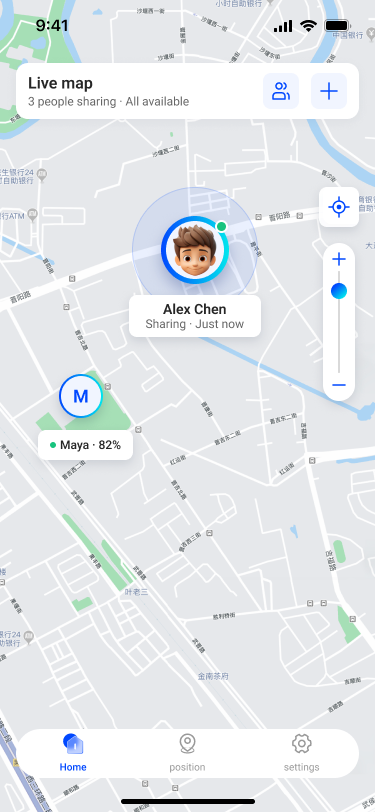
View the latest location reported by each connected profile, along with the time of the update.
Family location sharing for Android
Stay connected with the people you trust through voluntary location sharing, clear invitations, recent location history, and useful device status.
PinTogether is not an emergency response service.
The product
PinTogether combines location with timestamps and device status so connected people can understand whether an update is current.
View the latest location reported by each connected profile, along with the time of the update.
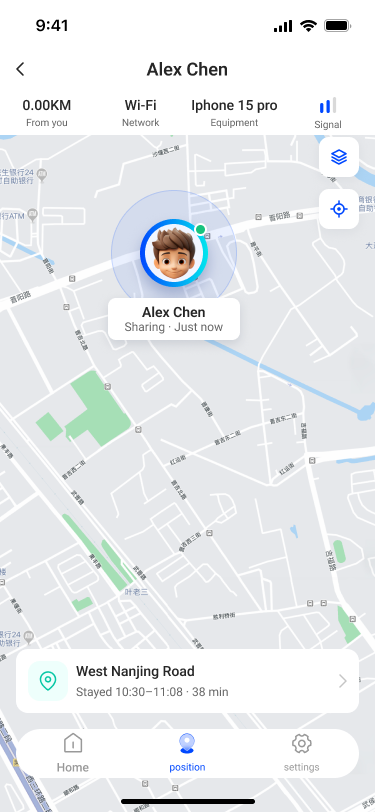
Open history only when needed to review recent movement and time spent at reported places.
See battery level, network type, signal level, and online status when the device reports them.
Invitation settings determine who can view whom. Do not share an invitation code publicly.
How it works
PinTogether is designed for people who know and trust each other. It is not intended for covert tracking.
Choose a display name and grant only the Android permissions needed for the location features you want to use.
Create or enter a short-lived invitation code and review whether the connection is one-way or mutual before accepting.
Connected profiles can view authorized location and device status. Permissions can be revoked from Android settings.
Privacy and safety
Precise location is sensitive. PinTogether uses visible Android permissions, a persistent foreground-service notification when background location is active, and invitation-scoped access.
Install or configure PinTogether on another person's device only with their knowledge and legal authorization.
A parent or legal guardian must authorize use on a minor's device and explain sharing in an age-appropriate way.
Only profiles authorized by an accepted invitation and sharing direction can receive location information.
Location can be delayed or inaccurate because of GPS, battery, network, device, or operating-system conditions.
Common questions
No. The app requires Android location permission on the reporting device and an accepted invitation before another profile can receive authorized location data. It must not be installed or configured covertly.
When enabled, background location allows the device to continue reporting while the app is not visible. Android displays a persistent foreground-service notification while the location service is active. You can revoke permission at any time.
Accuracy varies with GPS visibility, Wi-Fi and mobile networks, battery settings, movement, and device hardware. Always check the update time and accuracy information when available.
Detailed location history is generally retained for up to 7 days. The latest-known location may remain while a profile is active so connected users can see the last reported status.
Revoke location permission in Android settings and remove sharing relationships in the app when available. For account or data requests, contact [email protected].